
Database Research & Development

  • Home
  • NoSQL
    • NoSQL
    • Cassandra
  • Databases
    • Database Theory
    • Database Designing
    • SQL Server Coding Standards
    • SQL Server
    • PostgreSQL
    • MySQL
    • Greenplum
    • Linux
  • Interviews
    • SQL Server Interviews
    • MySQL Interviews
    • SQL Puzzles
  • DBA Scripts
    • SQL Server DBA Scripts
    • PostgreSQL DBA Scripts
    • MySQL DBA Scripts
    • Greenplum DBA Scripts
  • Home
  • Blog Archives !
  • (: Laugh@dbrnd :)
  • Contact Me !
sqlserverinterviews
Home 2015 September How to Insert if not exists in MySQL

How to Insert if not exists in MySQL

This article is half-done without your Comment! *** Please share your thoughts via Comment ***

In this post, I am sharing a demonstration on how to skip the INSERT statement for duplicate records in MySQL.

Insert if not exists:

Basically, there are two situations for bulk insertion:

First: during insertion, if the record exists, update the old value with new the value.

This I have already posted so please visit this page.
href=”https://www.dbrnd.com/2015/08/insert-update-merge-statement-in-mysql

Second: during insertion, if the record exists, skip the new value for an insert. This I am going to explain in this post.

MySQL INSERT IGNORE statement:

Using this, you can perform actions like, “Insert if not exists”.

First, create primary data by applying proper composite unique key or primary key.
If the same key is trying to INSERT during the new insertion, INSERT IGNORE Statement only skip that transaction.

Below is a full demonstration:
I created two tables and transferring some duplicate data from one to another using INSERT IGNORE statement.

Let’s first create tables and sample data:

1
2
3
4
5
6
7
8
9
10
11
12
13
14
15
CREATE TABLE tbl_First
(
ID INTEGER
,Name VARCHAR(255)
);
 
INSERT INTO tbl_First VALUES
(1,'ABC'),(1,'LKM')
,(3,'PQR'),(4,'XYZ');
 
CREATE TABLE tbl_Second
(
ID INTEGER PRIMARY KEY
,Name VARCHAR(255)
);

We created two tables, table first has no primary key and table second has a primary key.

You can find the duplicate key in the insert statement.

Now, first try to copy this data from the table first to the second table:

1
2
INSERT INTO tbl_Second
SELECT *FROM tbl_First;

After executing this, You will get an error for duplicate keys.

Now, apply INSERT IGNORE Statement:

1
2
INSERT IGNORE INTO tbl_Second
SELECT *FROM tbl_First;

1
SELECT *FROM tbl_Second;

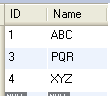
Result is :

MySQL Insert Ignore Statement

You can see the result where duplicate key ignored by the insert statement.

Sep 2, 2015Anvesh Patel
Prepared or Parameterized Statement in MySQLSELECT all columns to be good or bad in database system
Comments: 1
  1. wick
    January 22, 2016 at 1:10 am

    If some one desires expert view regarding blogging then i propose him/her to
    pay a quick visit this web site, Keep up the fastidious job.

Anvesh Patel

Database Engineer

September 2, 2015 MySQLAnvesh Patel, database, database research and development, dbrnd, insert if not exists, insert ignore, MySQL, MySQL Command, MySQL Database Administrator, MySQL Database Designing, MySQL Database Programming, MySQL Error, MySQL Performance Tunning, MySQL Query, MySQL Tips and Tricks
About Me!

I'm Anvesh Patel, a Database Engineer certified by Oracle and IBM. I'm working as a Database Architect, Database Optimizer, Database Administrator, Database Developer. Providing the best articles and solutions for different problems in the best manner through my blogs is my passion. I have more than six years of experience with various RDBMS products like MSSQL Server, PostgreSQL, MySQL, Greenplum and currently learning and doing research on BIGData and NoSQL technology. -- Hyderabad, India.

About DBRND !

dbrnd

This is a personal blog (www.dbrnd.com).

Any views or opinions represented in this blog are personal and belong solely to the blog owner and do not represent those of people, institutions or organizations that the owner may or may not be associated with in professional or personal capacity, unless explicitly stated.

Feel free to challenge me, disagree with me, or tell me I’m completely nuts in the comments section of each blog entry, but I reserve the right to delete any comment for any reason whatsoever (abusive, profane, rude, or anonymous comments) - so keep it polite.

The content of this website is protected by copyright. No portion of this website may be copied or replicated in any form without the written consent of the website owner.

Recent Comments !
  • Anvesh Patel { Sure will do... } – May 27, 12:43 PM
  • Anvesh Patel { Great... } – May 27, 12:41 PM
  • Anvesh Patel { Great... } – May 27, 12:39 PM
  • Anvesh Patel { Great... } – May 27, 12:36 PM
  • Anvesh Patel { Great... } – May 27, 12:28 PM
  • Anvesh Patel { Great... } – May 27, 12:27 PM
  • Anvesh Patel { Great... } – May 27, 12:16 PM
  • Older »
Follow Me !
  • facebook
  • linkedin
  • twitter
  • youtube
  • google
  • flickr
© 2015 – 2019 All rights reserved. Database Research & Development (dbrnd.com)
Posting....