
Database Research & Development

  • Home
  • NoSQL
    • NoSQL
    • Cassandra
  • Databases
    • Database Theory
    • Database Designing
    • SQL Server Coding Standards
    • SQL Server
    • PostgreSQL
    • MySQL
    • Greenplum
    • Linux
  • Interviews
    • SQL Server Interviews
    • MySQL Interviews
    • SQL Puzzles
  • DBA Scripts
    • SQL Server DBA Scripts
    • PostgreSQL DBA Scripts
    • MySQL DBA Scripts
    • Greenplum DBA Scripts
  • Home
  • Blog Archives !
  • (: Laugh@dbrnd :)
  • Contact Me !
sqlserverinterviews
Home 2015 August How to store and retrieve XML data into MySQL

How to store and retrieve XML data into MySQL

This article is half-done without your Comment! *** Please share your thoughts via Comment ***

MySQL doesn’t support XML data types like Microsoft SQL Server or PostgreSQL.

Many times it is required to store multiple nodes of data into a single column, in the form of XML.

In the MySQL, You have to store XML in CLOB (Character Large Object) data type.

MySQL provides different types of XML function so using those functions, we can parse the XML data very easily.

Below is a full demonstration on storing and retrieval of XML data:

First store XML data like any other string:

1
2
3
4
5
6
7
8
9
10
11
12
13
14
15
16
17
CREATE DATABASE `Employee`;
 
CREATE TABLE Employee.XMLTest
(
XMLDATA TEXT
);
 
INSERT INTO Employee.XMLTest
VALUES
(
'
1
Anvesh
2
Neevan
'
);

Second, Parsing this data using below stored procedure:

1
2
3
4
5
6
7
8
9
10
11
12
13
14
15
16
17
18
19
20
21
22
23
24
25
26
27
28
29
30
31
32
33
34
35
DELIMITER $$
CREATE PROCEDURE Employee.usp_ParseXMLData()
BEGIN
DECLARE i INT DEFAULT 1;
DECLARE XMLText TEXT;
DECLARE RNumber VARCHAR(50) ;
DECLARE RName VARCHAR(50);
SET XMLText = (SELECT XMLDATA FROM Employee.XMLTest);
CREATE TEMPORARY TABLE Employee.TempXMLData
(
RollNumber VARCHAR(50)
,Name VARCHAR(50)
);
SET RNumber = ExtractValue(XMLText, '//RollNumber[$i]');
WHILE RNumber != "" DO
SET RNumber = ExtractValue(XMLText, '//RollNumber[$i]');
SET RName = ExtractValue(XMLText, '//Name[$i]');
 
INSERT INTO Employee.TempXMLData
SELECT RNumber, RName;
SET i = i+1;
END WHILE;
SELECT
RollNumber
,Name
FROM Employee.TempXMLData
WHERE RollNumber <>'';
DROP TABLE Employee.TempXMLData;
END$$
DELIMITER ;

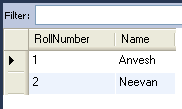
Call this stored procedure and check the result:

1
CALL Employee.usp_ParseXMLData();

MySQL XML

Aug 13, 2015Anvesh Patel

Please visit other related articles...

  • MySQL: Simplest way to move your InnoDB table from one Database to another Database
  • MySQL: InnoDB Table Compression, How we can Compressed Table?
  • MySQL: Script to find Long Running Queries and Transactions
  • MySQL: The ARCHIVE Storage Engine, store large amounts of unindexed DATA
  • MySQL: CSV Storage Engine, Store Table data into CSV File
  • MySQL 5.5: How to configure and enable Performance Schema Engine?
  • MySQL 5.5: Introduced PERFORMANCE_SCHEMA storage engine to inspect the performance data
  • MySQL: How Query Optimizer Read and Update the Index Statistics
How to reset MySQL root Password in UbuntuScript to Find and Kill Running Process in MySQL
Anvesh Patel

Database Engineer

August 13, 2015 MySQLAnvesh Patel, database, database research and development, ExtractValue, MySQL, MySQL Command, MySQL Database Administrator, MySQL Database Designing, MySQL Database Programming, MySQL Error, MySQL Performance Tunning, MySQL Query, MySQL Tips and Tricks, XML
About Me!

I'm Anvesh Patel, a Database Engineer certified by Oracle and IBM. I'm working as a Database Architect, Database Optimizer, Database Administrator, Database Developer. Providing the best articles and solutions for different problems in the best manner through my blogs is my passion. I have more than six years of experience with various RDBMS products like MSSQL Server, PostgreSQL, MySQL, Greenplum and currently learning and doing research on BIGData and NoSQL technology. -- Hyderabad, India.

About DBRND !

dbrnd

This is a personal blog (www.dbrnd.com).

Any views or opinions represented in this blog are personal and belong solely to the blog owner and do not represent those of people, institutions or organizations that the owner may or may not be associated with in professional or personal capacity, unless explicitly stated.

Feel free to challenge me, disagree with me, or tell me I’m completely nuts in the comments section of each blog entry, but I reserve the right to delete any comment for any reason whatsoever (abusive, profane, rude, or anonymous comments) - so keep it polite.

The content of this website is protected by copyright. No portion of this website may be copied or replicated in any form without the written consent of the website owner.

Recent Comments !
  • Anvesh Patel { Sure will do... }
  • Anvesh Patel { Great... }
  • Anvesh Patel { Great... }
  • Anvesh Patel { Great... }
  • Anvesh Patel { Great... }
  • Anvesh Patel { Great... }
  • Anvesh Patel { Great... }
  • Older »
Follow Me !
  • facebook
  • linkedin
  • twitter
  • youtube
  • google
  • flickr
© 2015 – 2019 All rights reserved. Database Research & Development (dbrnd.com)
Posting....