
Database Research & Development

  • Home
  • NoSQL
    • NoSQL
    • Cassandra
  • Databases
    • Database Theory
    • Database Designing
    • SQL Server Coding Standards
    • SQL Server
    • PostgreSQL
    • MySQL
    • Greenplum
    • Linux
  • Interviews
    • SQL Server Interviews
    • MySQL Interviews
    • SQL Puzzles
  • DBA Scripts
    • SQL Server DBA Scripts
    • PostgreSQL DBA Scripts
    • MySQL DBA Scripts
    • Greenplum DBA Scripts
  • Home
  • Blog Archives !
  • (: Laugh@dbrnd :)
  • Contact Me !
sqlserverinterviews
Home 2015 September Difference between datetime and timestamp in MySQL

Difference between datetime and timestamp in MySQL

This article is half-done without your Comment! *** Please share your thoughts via Comment ***

In this post, I am sharing the difference between DATETIME and TIMESTAMP data type of MySQL.

I am writing about this topic because this is very necessary and important for Database Developers.
Even many interviewers also ask this question in the MySQL interview.

For this topic, You can find many alternative answers over the internet. But still, I love to write in my way.

DATETIME vs TIMESTAMP:

TIMESTAMP used to track changes of records, and update every time when the record is changed.
DATETIME used to store specific and static value which is not affected by any changes in records.

TIMESTAMP also affected by different TIME ZONE related setting.
DATETIME is constant.

TIMESTAMP internally converted a current time zone to UTC for storage, and during retrieval convert the back to the current time zone.
DATETIME can not do this.

TIMESTAMP is 4 bytes and DATETIME is 8 bytes.

TIMESTAMP supported range:
‘1970-01-01 00:00:01′ UTC to ‘2038-01-19 03:14:07′ UTC
DATETIME supported range:
‘1000-01-01 00:00:00′ to ‘9999-12-31 23:59:59′

Let me demonstrate a small practical example:

Create test table and insert NOW() in the both column:

1
2
3
4
5
6
7
8
9
CREATE TABLE tbl_TestDateType
(
ID INTEGER
,Date1 DATETIME
,Date2 TIMESTAMP
);
 
INSERT INTO tbl_TestDateType
VALUES (1,NOW(),NOW());

Update a record after a few seconds:

1
UPDATE tbl_TestDateType SET ID=2;

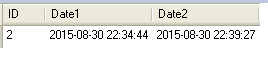
Check the value for both date, You will find old value in DATETIME column and updated TIMESTAMP column.

1
SELECT * FROM tbl_TestDateType;

MySQL DateTime Timestamp

Sep 4, 2015Anvesh Patel
SELECT all columns to be good or bad in database systemThe truth about to store images into the Database System or into the File System
Comments: 4
  1. Monika
    November 27, 2015 at 2:04 am

    Nice post !. Guys I am telling you, Anvesh is one of the next big person in Database Technology. He has just started blog and very popular in couple of months. Anvesh I can see your future after 3 to 4 year, you will be next to Pinal Dave(SQL Server Specialist).
    I am also Senior Database Architecture.
    Thanks for the help !

    • Anvesh Patel
      November 27, 2015 at 4:37 am

      Thanks Monika for such a nice comment !
      For any queries you can direct contact me at anvesh@dbrnd.com

  2. iceage
    May 5, 2016 at 1:58 am

    TIMESTAMP used to track changes to records, and update every time when the record is changed,
    ‘timestamp NOT NULL DEFAULT CURRENT_TIMESTAMP ON UPDATE CURRENT_TIMESTAMP’ make it;

    select version();
    +————+
    | version() |
    +————+
    | 5.6.28-log |
    +————+

    09:46:02 scott> create table t1 (id int,dt datetime,ts timestamp);
    Query OK, 0 rows affected (0.01 sec)

    09:46:31 scott> insert into t1 values (1,now(),now());
    Query OK, 1 row affected (0.01 sec)

    09:46:47 scott> select * from t1;
    +——+———————+———————+
    | id | dt | ts |
    +——+———————+———————+
    | 1 | 2016-05-05 09:46:47 | 2016-05-05 09:46:47 |
    +——+———————+———————+
    1 row in set (0.00 sec)

    09:46:54 scott> update t1 set id=2;
    Query OK, 1 row affected (0.00 sec)
    Rows matched: 1 Changed: 1 Warnings: 0

    09:47:03 scott> select * from t1;
    +——+———————+———————+
    | id | dt | ts |
    +——+———————+———————+
    | 2 | 2016-05-05 09:46:47 | 2016-05-05 09:47:03 |
    +——+———————+———————+
    1 row in set (0.00 sec)

    09:47:05 scott> show create table t1;
    +——-+————————————————————————————–+
    | Table | Create Table |
    +——-+————————————————————————————–+
    | t1 | CREATE TABLE `t1` (
    `id` int(11) DEFAULT NULL,
    `dt` datetime DEFAULT NULL,
    `ts` timestamp NOT NULL DEFAULT CURRENT_TIMESTAMP ON UPDATE CURRENT_TIMESTAMP
    ) ENGINE=InnoDB DEFAULT CHARSET=gbk |
    +——-+————————————————————————————–+
    1 row in set (0.00 sec)

    09:48:07 scott> create table t2 (id int,dt datetime,ts timestamp null);
    Query OK, 0 rows affected (0.01 sec)

    09:48:45 scott> show create table t2;
    +——-+————————————————————————————-+
    | Table | Create Table |
    +——-+————————————————————————————-+
    | t2 | CREATE TABLE `t2` (
    `id` int(11) DEFAULT NULL,
    `dt` datetime DEFAULT NULL,
    `ts` timestamp NULL DEFAULT NULL
    ) ENGINE=InnoDB DEFAULT CHARSET=gbk |
    +——-+————————————————————————————-+
    1 row in set (0.00 sec)

    09:48:52 scott> insert into t2 values (1,now(),now());
    Query OK, 1 row affected (0.00 sec)

    09:49:05 scott> select * from t2;
    +——+———————+———————+
    | id | dt | ts |
    +——+———————+———————+
    | 1 | 2016-05-05 09:49:05 | 2016-05-05 09:49:05 |
    +——+———————+———————+
    1 row in set (0.00 sec)

    09:49:11 scott> update t2 set id=2;
    Query OK, 1 row affected (0.00 sec)
    Rows matched: 1 Changed: 1 Warnings: 0

    09:49:19 scott> select * from t2;
    +——+———————+———————+
    | id | dt | ts |
    +——+———————+———————+
    | 2 | 2016-05-05 09:49:05 | 2016-05-05 09:49:05 |
    +——+———————+———————+

  3. Flimm
    May 30, 2019 at 7:17 pm

    The last code example is wrong. If you update a row to change the `ID` column, the other columns have no reason to change unless the columns were defined with an “ON UPDATE…” clause, which they weren’t. Please try running the queries and see for yourself.

Anvesh Patel

Database Engineer

September 4, 2015 MySQLAnvesh Patel, database, database research and development, DATETIME, dbrnd, MySQL, MySQL Command, MySQL Database Administrator, MySQL Database Designing, MySQL Database Programming, MySQL Error, MySQL Performance Tunning, MySQL Query, MySQL Tips and Tricks, TIMESTAMP
About Me!

I'm Anvesh Patel, a Database Engineer certified by Oracle and IBM. I'm working as a Database Architect, Database Optimizer, Database Administrator, Database Developer. Providing the best articles and solutions for different problems in the best manner through my blogs is my passion. I have more than six years of experience with various RDBMS products like MSSQL Server, PostgreSQL, MySQL, Greenplum and currently learning and doing research on BIGData and NoSQL technology. -- Hyderabad, India.

About DBRND !

dbrnd

This is a personal blog (www.dbrnd.com).

Any views or opinions represented in this blog are personal and belong solely to the blog owner and do not represent those of people, institutions or organizations that the owner may or may not be associated with in professional or personal capacity, unless explicitly stated.

Feel free to challenge me, disagree with me, or tell me I’m completely nuts in the comments section of each blog entry, but I reserve the right to delete any comment for any reason whatsoever (abusive, profane, rude, or anonymous comments) - so keep it polite.

The content of this website is protected by copyright. No portion of this website may be copied or replicated in any form without the written consent of the website owner.

Recent Comments !
  • Anvesh Patel { Sure will do... } – May 27, 12:43 PM
  • Anvesh Patel { Great... } – May 27, 12:41 PM
  • Anvesh Patel { Great... } – May 27, 12:39 PM
  • Anvesh Patel { Great... } – May 27, 12:36 PM
  • Anvesh Patel { Great... } – May 27, 12:28 PM
  • Anvesh Patel { Great... } – May 27, 12:27 PM
  • Anvesh Patel { Great... } – May 27, 12:16 PM
  • Older »
Follow Me !
  • facebook
  • linkedin
  • twitter
  • youtube
  • google
  • flickr
© 2015 – 2019 All rights reserved. Database Research & Development (dbrnd.com)
Posting....