
Database Research & Development

  • Home
  • NoSQL
    • NoSQL
    • Cassandra
  • Databases
    • Database Theory
    • Database Designing
    • SQL Server Coding Standards
    • SQL Server
    • PostgreSQL
    • MySQL
    • Greenplum
    • Linux
  • Interviews
    • SQL Server Interviews
    • MySQL Interviews
    • SQL Puzzles
  • DBA Scripts
    • SQL Server DBA Scripts
    • PostgreSQL DBA Scripts
    • MySQL DBA Scripts
    • Greenplum DBA Scripts
  • Home
  • Blog Archives !
  • (: Laugh@dbrnd :)
  • Contact Me !
sqlserverinterviews
Home 2017 February SQL Server: Move your Table from one File Group to another File Group

SQL Server: Move your Table from one File Group to another File Group

This article is half-done without your Comment! *** Please share your thoughts via Comment ***

If you are finding most top 10 steps for SQL Server Performance tuning, you could get one of the items in the list is “multiple file-groups and various data-files increases the query performance”.This is correct.

You can move your fat table from master or primary data group to another custom file group.
It gives you more performance and very easy to do maintenance.

I am also asking this question to SQL DBA like “how to move a table from one File Group to another File Group?” and most of the times I am getting answers like “Create new file group -> Replicate table schema -> Move data -> Drop old table”.

The above answer is right, but instead of this great exercise, we can move a table to new file group by creating a clustered index only.

Here, You can access full demonstration.
Create a sample table:

1
2
3
4
5
6
7
CREATE TABLE tbl_Students
(
StudID INT IDENTITY(1,1)
,Name VARCHAR(10)
,CONSTRAINT pk_tbl_Students_StudID PRIMARY KEY(StudID)
)
GO

Insert few dummies record:

1
2
INSERT INTO tbl_Students(Name) VALUES ('Anvesh')
GO 100000

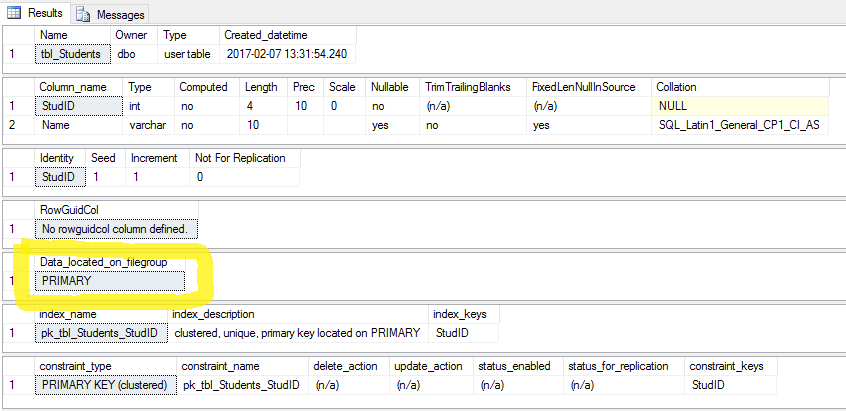
Check the table Information:

1
2
EXEC SP_HELP 'tbl_Students'
GO

SQL Server File Group Migration

Alter a database to add new file group:

1
2
ALTER DATABASE Database_Name ADD FILEGROUP New_FileGroup
GO

Add new data file (.ndf):

1
2
3
4
5
6
7
8
ALTER DATABASE Database_Name ADD FILE
(
NAME = 'New_DataFile',
FILENAME = 'C:\TempSQLData\New_DataFile.ndf',
SIZE = 100000KB,
FILEGROWTH = 65000KB
) TO FILEGROUP New_FileGroup
GO

Create a new CLUSTERED index on table within created new file group:

1
2
3
4
5
6
7
CREATE UNIQUE CLUSTERED INDEX pk_tbl_Students_StudID ON tbl_Students(StudID)
WITH
(
DROP_EXISTING = ON
)
ON New_FileGroup
GO

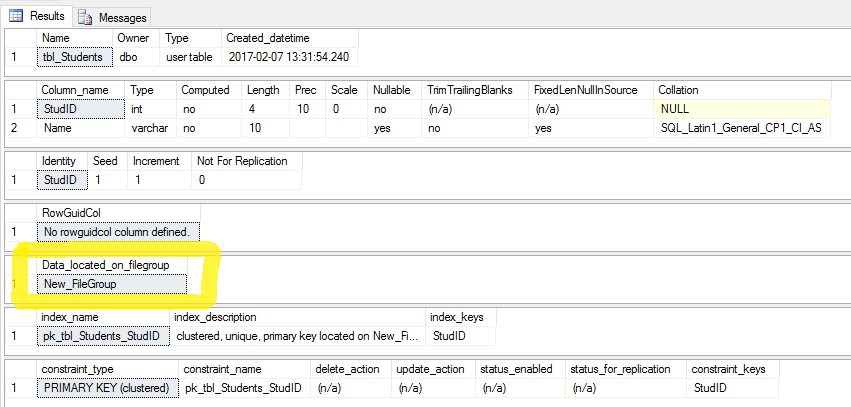
Check the table information:

1
2
EXEC SP_HELP 'tbl_Students'
GO

SQLServer File Group Migration 2

If you need a space of old table, you can shrink your database:

1
2
DBCC SHRINKFILE ('Database_Name' , 0)
GO
Feb 10, 2017Anvesh Patel
PostgreSQL: pg_rotate_logfile to Switch and Rotate the server log file (pg_log)PostgreSQL: Find a Table location using pg_relation_filepath
Comments: 2
  1. rmai
    February 28, 2017 at 8:17 am

    Hey Anvesh, nice write up but i am getting below error… please help me!

    SQL Server – Error: 5042 – The file ‘FileName’ cannot be removed because it is not empty

    • Anvesh Patel
      March 3, 2017 at 7:38 pm

      The solution is to shrink your empty file before deleting an actual. You can use EMPTYFILE option in DBCC SHRINKFILE to remove all junk data of a file. I will prepare a small article on this and will publish it.

Anvesh Patel

Database Engineer

February 10, 2017 SQL Server.ndf, Anvesh Patel, clustered index, Data File, database, database research and development, dbrnd, File group, move table, SQL Query, SQL Server, SQL Server Administrator, SQL Server Error, SQL Server Monitoring, SQL Server Performance Tuning, SQL Server Programming, SQL Server Tips and Tricks, TSQL
About Me!

I'm Anvesh Patel, a Database Engineer certified by Oracle and IBM. I'm working as a Database Architect, Database Optimizer, Database Administrator, Database Developer. Providing the best articles and solutions for different problems in the best manner through my blogs is my passion. I have more than six years of experience with various RDBMS products like MSSQL Server, PostgreSQL, MySQL, Greenplum and currently learning and doing research on BIGData and NoSQL technology. -- Hyderabad, India.

About DBRND !

dbrnd

This is a personal blog (www.dbrnd.com).

Any views or opinions represented in this blog are personal and belong solely to the blog owner and do not represent those of people, institutions or organizations that the owner may or may not be associated with in professional or personal capacity, unless explicitly stated.

Feel free to challenge me, disagree with me, or tell me I’m completely nuts in the comments section of each blog entry, but I reserve the right to delete any comment for any reason whatsoever (abusive, profane, rude, or anonymous comments) - so keep it polite.

The content of this website is protected by copyright. No portion of this website may be copied or replicated in any form without the written consent of the website owner.

Recent Comments !
  • Anvesh Patel { Sure will do... } – May 27, 12:43 PM
  • Anvesh Patel { Great... } – May 27, 12:41 PM
  • Anvesh Patel { Great... } – May 27, 12:39 PM
  • Anvesh Patel { Great... } – May 27, 12:36 PM
  • Anvesh Patel { Great... } – May 27, 12:28 PM
  • Anvesh Patel { Great... } – May 27, 12:27 PM
  • Anvesh Patel { Great... } – May 27, 12:16 PM
  • Older »
Follow Me !
  • facebook
  • linkedin
  • twitter
  • youtube
  • google
  • flickr
© 2015 – 2019 All rights reserved. Database Research & Development (dbrnd.com)
Posting....